Database's Network
On this page, you can find what database’s endpoints (load balancers) are and how to manage them in the Cloud Console.
Table of contents
Introduction
A Database is reachable through load balancers - endpoints with their own IP address and port:
- the public load balancer has a public IP address, is reachable from the internet and is restricted by a list of allowed addresses;
- internal load balancers have an address in one of your private subnets and are reachable only from that network. A Database can have up to 16 of them, each in its own subnet and with its own list of allowed addresses.
Both are managed on the NETWORK TAB of the Database details page. The buttons are not available while the Database is being updated. If a change cannot be applied, the details page shows the notice Load balancer not applied with the reason.
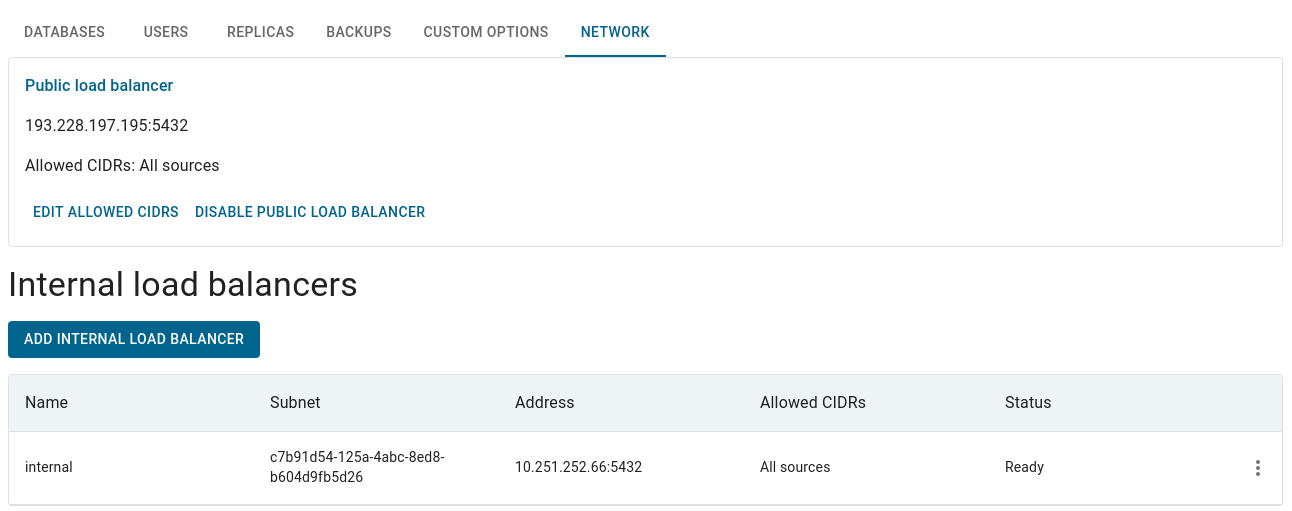
Public load balancer
The card shows the address and port (or a message such as Provisioning or Disabled), the Allowed CIDRs (All sources means no restriction) and the Pooler address if the pooler is on.
- Edit allowed CIDRs - enter IPv4 networks with a prefix length, one per line (for example
192.168.1.101/32) and save. This replaces the IP ACL that was set when the Database was created. An empty list allows all sources on the internet, so restrict the list to the addresses of your applications and administrators. - Disable / Enable public load balancer - disabling releases the IP address and disconnects public clients; enabling it again can assign a different IP address, so update your clients and DNS afterwards. Make sure your applications can reach the Database through another endpoint before you disable the public one. After disabling, the card can show a pending message for some time until the endpoint is removed completely.
Internal load balancers
The table shows for every endpoint: Name, Subnet, Address (Pending until it gets one), Allowed CIDRs (All sources means every address of the private network), Status (Ready, Provisioning or the reason of a problem) and, while the pooler is on, its Pooler address.
| Action | Description |
|---|---|
| Add internal load balancer | Name - unique, starts with a lowercase Latin letter, lowercase letters, digits and dashes, up to 32 characters (default is reserved for the endpoints of Databases created before this feature appeared). Subnet - the subnet where the endpoint gets its address. Private static IP (optional) - a fixed IPv4 address from the selected subnet; if empty, an address is assigned automatically. Allowed CIDRs - IPv4 networks that may connect, one per line; empty allows all sources of the private network |
| Edit (row Actions menu) | everything except the name. Changing the subnet or the private IP recreates the endpoint, disconnects its clients and can change its IP address |
| Remove (row Actions menu) | releases the IP address and disconnects the clients of the endpoint; the Database keeps running |
Connection pooler endpoints
If the connection pooler (PgBouncer) is enabled for a PostgreSQL or TimescaleDB Database (see Databases), the platform creates a pooler endpoint (port 6432) beside the public endpoint and beside every internal endpoint, in the same subnet and with the same list of allowed addresses. Their addresses are shown in the Pooler line of the public card and in the Pooler column of the internal table; Provisioning is shown until an endpoint is ready.